Visual capture in the graph
Alternatively, you can create entities directly in the graph area and link them together. The graph provides a clear representation of your investigation and makes complex relationships easier to understand.
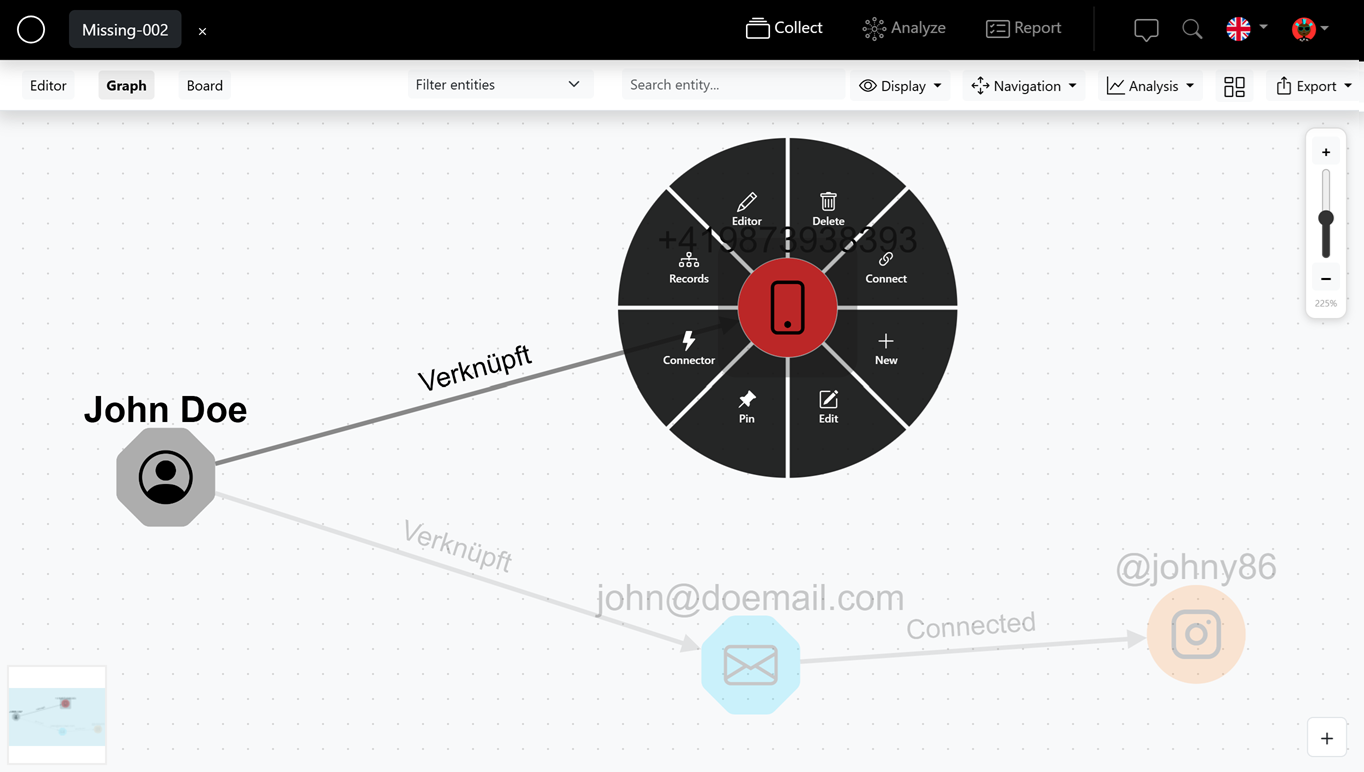
Create entities in the graph
To get started, drag an entity into the graph with your mouse. If you press and hold the mouse on an entity, a context menu opens with additional options for editing and linking – such as "Edit", "Connect from here" or "Show/hide nodes from media".
Media in the graph
Media are attached directly to the respective entity in the graph and can be shown or hidden flexibly.
Create links
You create links between entities intuitively: either via the context menu, or by simply dragging the desired entity onto the element you want to connect it to. This quickly builds a network of your investigation.
Filter by type
The graph view can be filtered specifically by entity type – making it easier to keep an overview in large investigations.
Screenshot & layouts
You can take a screenshot of the current graph directly from the application to capture the state of your investigation as an image. Various layout options are also available – e.g. hierarchical, circular or freely arranged.
Move multiple entities
To move several entities at once, hold down the CTRL key and select the desired elements with your mouse.